


win 安装 pyenv
以管理员身份打开powershell
# 解决权限问题
Set-ExecutionPolicy RemoteSigned -Scope CurrentUser
# 运行安装命令
Invoke-WebRequest -UseBasicParsing -Uri "https://raw.githubusercontent.com/pyenv-win/pyenv-win/master/pyenv-win/install-pyenv-win.ps1" -OutFile "./install-pyenv-win.ps1"; &"./install-pyenv-win.ps1"
# 测试
pyenv --version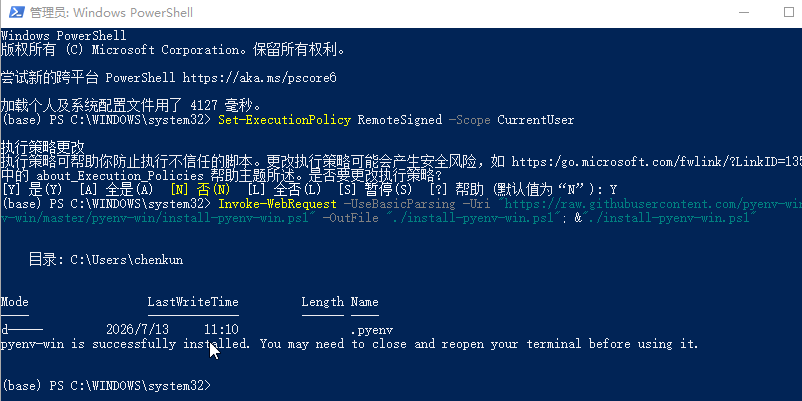
配置镜像源
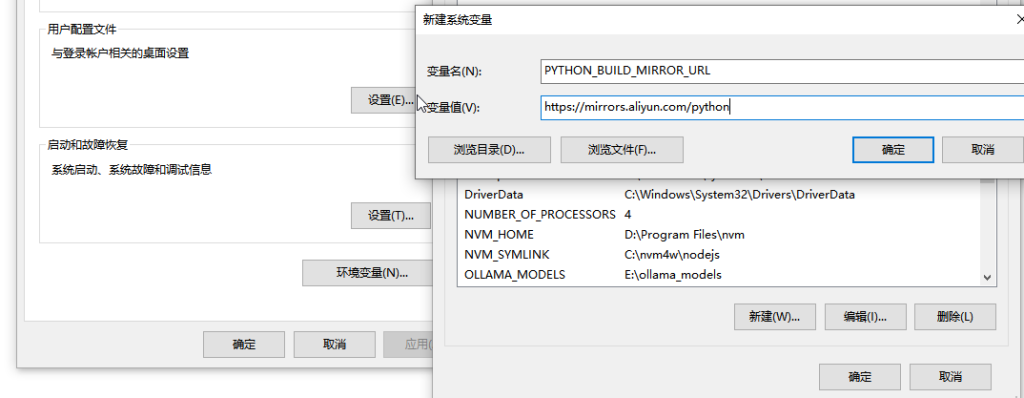
- 右键「此电脑」→「属性」→「高级系统设置」→「环境变量」。
- 在用户变量(只影响当前用户)或系统变量(所有用户)里点「新建」:
- 变量名:
PYTHON_BUILD_MIRROR_URL - 变量值:填下面任意一个国内源
- https://mirrors.aliyun.com/python
https://mirrors.tuna.tsinghua.edu.cn/python/
https://mirrors.huaweicloud.com/python/
https://registry.npmmirror.com/-/binary/python/
- 变量名:
全部确定,关闭旧 PowerShell,新开一个即可。
pyenv 使用
# 查看所有可安装的python版本
pyenv install --list
# 利用管道命令搜索
pyenv install --list | grep "^ 3.14"
# 安装特定版本
pyenv install 3.14.1
# 卸载特定版本
pyenv uninstall 3.14.1
# 查看已安装的版本
pyenv versions
# 查看当前正在使用哪个版本
pyenv version
# 切换全局版本
pyenv global 3.14.1
# 切换本地版本
pyenv local 3.14.1
# 切换当前终端版本(临时生效)
pyenv shell 3.14.1VSCode插件
- Python 语法高亮、代码提示、运行调试、虚拟环境识别,最核心。
- Code Runner 右键一键运行Python代码,不用敲命令,新手超好用。
- Black Formatter 自动格式化代码,统一代码风格,不用手动排版。
- Chinese (Simplified) VSCode界面汉化,零基础友好。
VSCode配置
code runner 配置
"code-runner.executorMap": {
  // ...
  // 这里要填写 python 的绝对路径
  "python": "/Users/yuanjin/.pyenv/shims/python -u",
}
自动格式化配置
"editor.formatOnSave": true,
"[python]": {
  "editor.defaultFormatter": "ms-python.black-formatter",
  "editor.tabSize": 4,
  "editor.insertSpaces": true,
}